
*** Встречали такое? ***, Help |
Наши новости:
|
 Создание, настройка и продвижение counter-strike 1.6 серверов > > Создание, настройка и продвижение counter-strike 1.6 серверов > Общие вопросы по созданию и настройке сервера > *** Встречали такое? ***
 Информационная доска
Данный раздел предназначен для обсуждения, а также решения технических проблем связанных с серверной частью. Обсуждения касательно игровых клиентов ведутся здесь.
1. Во время создания новой темы аккуратно оформляйте её, не допускайте грамматических ошибок.
2. Описывая проблему старайтесь, как можно больше рассказать о ней, а так же о действиях с сервером после которых она возникла, по возможности подкрепите информацию логами.
3. Если вопрос касается проблемы в работе сервера, то обязательно прикрепляйте список плагинов (введите в консоли сервера: meta list и amxx plugins), настройки server.cfg, логи. Так же указывайте операционную систему, версию HLDS (введите к консоли сервера: version) и где хостится сервер.
Длинную информацию скрывайте под спойлер.
1. Во время создания новой темы аккуратно оформляйте её, не допускайте грамматических ошибок.
2. Описывая проблему старайтесь, как можно больше рассказать о ней, а так же о действиях с сервером после которых она возникла, по возможности подкрепите информацию логами.
3. Если вопрос касается проблемы в работе сервера, то обязательно прикрепляйте список плагинов (введите в консоли сервера: meta list и amxx plugins), настройки server.cfg, логи. Так же указывайте операционную систему, версию HLDS (введите к консоли сервера: version) и где хостится сервер.
Длинную информацию скрывайте под спойлер.
|
|
 Fedcomp
|
 30.1.2009, 13:31
Сообщение
|

|
Кто то тебя активно атакует
|
   |


|
 Поблагодарили
 torz
torz
|
30.1.2009, 21:06
Сообщение
|
|
|
В общем лазал в инете а наткнулся на:
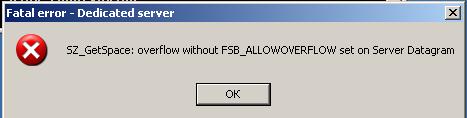
http://www.100acrebloodbath.com/files/lib/...beta_plugin.zip Скачать не могу но ссылка активная, все америкосы эту библиотеку качают от туда. Она от SZ_GetSpace: overflow... у меня стоит версия NoSeeVar 1.21, попробую обновить и отпишусь! Выложите кто может скачать, с меня + |
|
|
|


|
torz
|
31.1.2009, 9:55
Сообщение
|
|
|
Обновите Plague вышла версия 4,1 beta 1, хотя с обновлением тоже, поставил обратно 47 протокол. Пока не разберусь с ошибками)
|
|
|
|
|
torz
|
31.1.2009, 10:20
Сообщение
|
|
|
По поводу ошибки: SZ_GetSpace: overflow without FSB_ALLOWOVERFLOW set on Server Reliable Datagram, есть патч исправляющий эти ошибки. Автор пишет что исправляет ошибки:
-"ERROR: SZ_GetSpace: overflow without FSB_ALLOWOVERFLOW set" crashing servers -"ERROR: Dormant entity player is thinking!!" crashing servers -Problem with fragmentation & reassembly of packets. Файл: sw.dll Ссылка http://forums.inspiredgaming.com/reply.php...1350&q=true Если кто скачает, выкладываем. |
|
|
|
|
torz
|
31.1.2009, 10:38
Сообщение
|
|
|
Ещё ссылка с испралением: http://www.3dactionplanet.com/news/archive...2&year=2001
|
|
|
|
|
torz
|
31.1.2009, 11:23
Сообщение
|
|
|
В общем вот рабочая ссылка
http://bastelstube.4players.de/cs.php/down.../965/index.html Качаем обновление и пробуем Код Win32 README 1/5/01
To run the Half-Life/TFC dedicated server, run the installation executable and follow the appropriate steps. Start the server by running "hlds". After it has loaded, you are able to type commands into the server. During load time, you should see a message that says, "WON Auth". This means that you are automatically registered on the Internet and people can start joining your game. If you don't see "WON Auth" but instead see "Auth Server", this means that you did not authenticate with the WON server either because you have an older version of the server or you may not be able to reach the WON servers due to a firewall or proxy. After the server is loaded, you can set the number of allowed players with the maxplayers ("maxplayers 16") command. I would not recommend any more than 16 players on a 200mhz machine. To start the maps, use the map command ("map cz2"). Changes for the Win32 Server in version 4.1.0.5: - Added a new TFC server cvar, tfc_spectchat, that will allow the server to regulate whether or not spectators can chat with players in the game. When set to 0, spectators can only chat with other spectators. When set to anything but 0, spectators can chat with everyone in the game. - Merged a bit of missing code between versions 1.1.0.1 and 1.1.0.4 - Fixed "ERROR: SZ_GetSpace: overflow without FSB_ALLOWOVERFLOW set" crashing servers - Fixed "ERROR: Dormant entity player is thinking!!" crashing servers - Problem with fragmentation & reassembly of packets. - Fixed the rcon 'say' command putting " " around every token - Fixed small memory leak problem when using bots - Put client's IP address back into the 'status' command - If a player suicides (types "kill" in the console) while infected, the medic who infected him will get a kill. - If a player changes teams while infected, the medic who infected him will get a kill. - Fixed a bug where players could teamkill by shooting a rocket/grenade at a teammate and switching to spectator mode. - Fixed the "adm_deal", "adm_next", and "next" commands to properly cycle through the players in the server. - Fixed the problem with some clients lagging for a round or two at the beginning of a map. - Fixed the "listmaps" command so it displays all the maps (it was skipping the last one in the list). Changes for the Win32 Server in version 4.1.0.4: - This update contains three new TF maps: Avanti, Flagrun, and Casbah. - Pyro's burn damage increased in Team Fortress. - Heavy Weapons Guy's chaingun damage reduced. - All map resources can be downloaded from the game server now. Refer to readme.txt for details. - Anti-grenade triggers added to 2Fort spawn rooms. - Team selection also available from class selection screen in Team Fortress. - In-Game text upgraded. - Last weapon used key persists over a player death now. - Counter-Strike proxy cheat fixed. - High frame rate connection problem fixed. - Cockroaches can now be killed in single player. - 'Tell' command crash fixed in Team Fortress. - Rcon buffer overflow fixed. Changes for the Win32 Server in version 4.1.0.3: - Fixed problem where servers could not handle more than 24 clients. - Fixed spy burrowing into the ground. - Fixed svc_bad connection problem. - Fixed spy disguise as team 3/4 on two team maps. - Fixed spy disguise crash. Changes for the Win32 Server in version 3.1.0.2: - Fixed crash when clients have specific characters in their names. - Fixed stout buffering problem. Changes for the Win32 Server in version 4.1.0.1: - Fixed performance problem on ATI Rage video cards. - Fixed 'Unassigned' in scoreboard bug. - Fixed death messages being delayed when downloading a custom decal. - Fixed 'Out of Handles' crash on dedicated server. - Fixed bug where player models would be drawn incorrectly in Team Fortress 1.5 - Fixed fakelag exploit. - Fixed mmx optimization. - Restart command fixed on dedicated server. - Fixed two flags in Dustbowl bug. - Fixed longjump in Half-Life DM. - Fixed spectator grenade exploit. - Fixed changeteam grenade exploit. - Fixed LoGADDRESS command. Changes for the Win32 Server in past versions: - This update includes a complete rewrite of Half-Life's networking system. - Three new maps included (Dustbowl, Epicenter, and Warpath). - Engineer upgrades sentry gun immediately. - Dispensers can be used by touching them. - Spectator mode added. - Number pad keys are now bindable independent. - Support for mouse buttons 4 and 5. - You will get a point in TFC for destroying an enemy sentry gun. - Engineer can view other Engineer's sentry gun stats via HUD. - Tell command added to TFC. - The class of everyone on your team is available via the scoreboard. - Grenade timer added to TFC. - Updated netgraph, use net_graph 3 - TFC Manual updated with all information pertaining to this update. - Console and in-game chat uses a True Type font. - Player names are colored according to team in TFC when talking. - MOTD length increased for server operators. - "Say" no longer includes the server name in the 64 character limit. - Various crash fixes. - readline.so no longer required. - Team 4 can now score on 4 player TFC maps. - Fixed soldier's nail grenades in TFC. - We are changing the version number of the server from 1.x.x.x to 3.x.x.x for the Linux server to differentiate between the server and client releases. - Typing 'version' at the server console will give you the version you are running. - Server now allows banning by userid and WON id. Refer to TFCServer.htm located in your \halflife\tfc\manual directory. - HTML TFC manual included with 3.0.1.3 Linux server with information on running a server. - TFStats for Linux will be released in the very near future. - TF Stats version 1.5 for Linux included. - Half-Life setinfo bug fixed. - Added better debugging code for TFC map makers. - Fixed bug in trigger_changelevel. CUSTOM RESOURCE DOWNLOADING Something that has always limited the propagation of custom maps has been the lack of support for custom map resources. Running a custom map that has it's own .wad file, custom sprites, or precached sounds has been something of a burden to server operators. So, we've added a new feature/function to help simplify the process. For this example let's assume we have a Team Fortress map called "mymap.bsp". This map uses a few different custom resources. It has it's own .wad file called "mytextures.wad", a new model called "mymodel.mdl", and a new sprite called "mysprite.spr". As a server operator you will need to go through these steps to allow these resources to be downloaded: 1. Create a file called "mymap.res" and place it into the \tfc\maps directory. The .res file must be the same as the .bsp name. 2. Add the resource names relative to the game directory in this file. The file should look like this: mywad.wad models\mymodel.mdl sprites\mysprite.spr 3. Run your server with sv_allowdownload set to 1. When a client connects they will start downloading these files. The client's download speed/bandwidth is throttled according to their rate. This will not replace any files that are currently on the client's machine. There are seven valid file types for this: Maps (.bsp) Textures (.wad) Models (.mdl) Sprites (.spr) Bitmaps (.bmp) Sound files (.wav) Targas (.tga) Common Questions: 1) I start the server and nothing happens. After running hlds, you need to set the number of allowed players (see above) and start a map. You can do all of this from the command line as well: hlds -game tfc +maxplayers 16 +map cz2 2) How do I start a TFC server? Use the -game tfc option. 3) How do I start a lan server? hlds -nomaster +sv_lan 1 4) Where can I get help? Subscribe to the one of the dedicated server mailing lists by sending mail to listadmin@valvesoftware.com with subscribe <the name of the mailing list below you want to subscribe to> in the message body. hlds_announce@valvesoftware.com - general dedicated server announcements hlds@valvesoftware.com - general dedicated server discussion hlds_linux@valvesoftware.com - linux specific dedicated server discussion Also, there are several user-run support sites on the net: http://commands.halflife.org http://www.pcgame.com/randy/tfc/console/all.htm http://www.planethalflife.com/commands/ 6) What are the server commands/cvars: changelevel mapname - change map, maintain client connections map mapname - change map, disconnect currently connected players status - return the status of the server restart - restart the server exec file.cfg - execute a script file quit - stop the server Client Variables cl_bob Default: 0 cl_bobcycle Default: 0 cl_bobup Default: 0 cl_rollangle Default: 2 cl_waterdist Default: 4 cl_rollspeed Default: 200 Multiplayer Variables 1 means on/allowed, 0 means off/disallowed. * means any integer is acceptable, 0 means no limit mp_autocrosshair Default: 1 mp_falldamage Default: 1 mp_flashlight Default: 0 mp_footsteps Default: 1 mp_forcerespawn Default: 1 mp_friendlyfire Default: 0 mp_teamplay Default: 0 mp_weaponstay Default: 0 mp_allowmonsters Default: 0 mp_fraglimit* Default: 0 mp_timelimit* Default: 0 Server Variables sv_accelerate Default: 10 sv_aim Default: 1 sv_airaccelerate Default: 10 sv_airmove Default: 1 sv_allowdownload Default: 1 sv_allowupload Default: 1 sv_bounce Default: 1 sv_challengetime Default: 15 sv_cheats Default: 0 sv_clienttrace Default: 1 sv_clipmode Default: 0 sv_friction Default: 4 sv_gravity Default: 800 sv_idealpitchscale Default: 0 sv_language Default: 0 sv_masterprint Default: 1 sv_masterprinttime Default: 5 sv_maxspectators Default: 8 sv_maxspeed Default: 320 sv_maxvelocity Default: 2000 sv_netsize Default: 0 sv_newunit Default: 0 sv_password Default: 0 sv_showcmd Default: 0 sv_skyname Default: 0 sv_spectalk Default: 1 sv_spectator_password Default: 0 sv_spectatormaxspeed Default: 500 sv_stepsize Default: 18 sv_stopspeed Default: 100 sv_timeout Default: 65 sv_upload_maxsize Default: 0 sv_wateraccelerate Default: 10 sv_wateramp Default: 0 sv_waterfriction Default: 1 sv_zmax Default: 4096 Team Play Variables team1_color Default: 0 team1_model Default: 0 team1_name Default: 0 team1_skin Default: 0 team2_color Default: 0 team2_model Default: 0 team2_name Default: 0 team2_skin Default: 0 brightness Default: 0 chase_active Default: 0 chase_back Default: 100 chase_right Default: 0 chase_up Default: 16 clientport Default: 27005 cmdline Default: 0 con_notifytime Default: 1 coop Default: 0 crosshair Default: 0 deathmatch Default: 1 decalfrequency Default: 30 developer Default: 0 direct Default: 0 displaysoundlist Default: 0 edgefriction Default: 2 fakelag Default: 0 fakeloss Default: 0 filterban Default: 1 fps_lan Default: 72 fps_modem Default: 30 fps_single Default: 72 gamma Default: 2 host_framerate Default: 0 host_killtime Default: 0 host_speeds Default: 0 HostMap Default: 0 hostname Default: 0 hostport Default: 0 ip Default: 0 ip_clientport Default: 0 ip_hostport Default: 0 ipx_clientport Default: 0 ipx_hostport Default: 0 lambert Default: 1 lcd_x Default: 0 lcd_yaw Default: 0 lightgamma Default: 2 mapcyclefile Default: 0 netchokeloop Default: 0 noip Default: 0 noipx Default: 1 pausable Default: 1 pm_pushfix Default: 0 port Default: 27015 r_netgraph Default: 0 rcon_password Default: 0 registered Default: 0 scr_ofsx Default: 0 scr_ofsy Default: 0 scr_ofsz Default: 0 serverprofile Default: 0 showdrop Default: 0 showpackets Default: 0 showtriggers Default: 0 skill Default: 1 sys_ticrate Default: 0 texgamma Default: 2 violence_ablood Default: 1 violence_agibs Default: 1 violence_hblood Default: 1 violence_hgibs Default: 1 View Variables v_centermove Default: 0 v_centerspeed Default: 500 v_dark Default: 0 v_idlescale Default: 0 v_ipitch_cycle Default: 1 v_ipitch_level Default: 0 v_iroll_cycle Default: 0 v_iroll_level Default: 0 v_iyaw_cycle Default: 2 v_iyaw_level Default: 0 v_kickpitch Default: 0 v_kickroll Default: 0 v_kicktime Default: 0 Please report any problems to erik@valvesoftware.com Enjoy! |
|
|
|
|
torz
|
31.1.2009, 18:52
Сообщение
|
|
|
Сменил протокол, обратно на 47, этой ошибки нет. В чем же дело?
|
|
|
|
|
torz
|
1.2.2009, 6:47
Сообщение
|
|
|
ППЦ, и с 47 протоколом упало по ошибке "SZ_GetSpace: overflow without FSB_ALLOWOVERFLOW set on Server Reliable" что делать? не ужели нет защиты какой либо?

|
|
|
|
|
Fedcomp
|
1.2.2009, 12:39
Сообщение
|
|
|
Дай в глаз тому хакеру :biggrin:
тут не защита а нападение нужно :) ПОпробуй другой патч, авось поможет |
|
|
 Поблагодарили 1 раз Поблагодарили 1 раз
|

|
torz
|
6.2.2009, 16:00
Сообщение
|
|
|
UP!
|
|
|
|
|
Fedcomp
|
6.2.2009, 18:16
Сообщение
|
|
|
Цитата(torz @ 3.2.2009, 10:20)  Can't use keys or values with a \ Это эксплойт  Здесь вроде тоже интернет или как? Здесь вроде тоже интернет или как?
|
|
|
|
|
Mr.Dmitry
|
6.2.2009, 19:33
Сообщение
|

|
Попробуй статистику обнулить :)
|
|
|
Поблагодарили 1 раз
|
  |
0 пользователей и 1 гостей читают эту тему:

Powered By Invision Power Board
© 2005-2026
Counter Strike Support Community
Counter Strike Support Community