Правила форума Гаранты форума
Размещение рекламы AMX-X компилятор

Здравствуйте, гость Вход | Регистрация

Наши новости:

14-дек
24-апр
10-апр
11-апр

> Информационная доска

Данный раздел предназначен для обсуждения, а также решения технических проблем связанных с серверной частью. Обсуждения касательно игровых клиентов ведутся здесь.

1. Во время создания новой темы аккуратно оформляйте её, не допускайте грамматических ошибок.
2. Описывая проблему старайтесь, как можно больше рассказать о ней, а так же о действиях с сервером после которых она возникла, по возможности подкрепите информацию логами.
3. Если вопрос касается проблемы в работе сервера, то обязательно прикрепляйте список плагинов (введите в консоли сервера: meta list и amxx plugins), настройки server.cfg, логи. Так же указывайте операционную систему, версию HLDS (введите к консоли сервера: version) и где хостится сервер.

Длинную информацию скрывайте под спойлер.

Как Привязать Amxbans С Другова Пк Не Там Где Установлен Сайт?

Статус пользователя CEST
сообщение 15.12.2009, 13:44
Сообщение #1
Стаж: 18 лет

Сообщений: 106
Благодарностей: 3
Полезность: 29

Имею 2 тачки.

Одна кс тачка
другая appserv на ней сайт

Как можно сделать чтоб 1 тачки была привязка к 2 пк amxbans ?
Перейти в начало страницы         Просмотр профиля    Отправить личное сообщение
   Цитировать сообщение
Статус пользователя ziumer
сообщение 15.12.2009, 14:48
Сообщение #2


Стаж: 18 лет

Сообщений: 270
Благодарностей: 42
Полезность: < 0

Цитата(CEST @ 15.12.2009, 14:44) *
Имею 2 тачки.

Одна кс тачка
другая appserv на ней сайт

Как можно сделать чтоб 1 тачки была привязка к 2 пк amxbans ?


Указать в sql.cfg данные той тачки, где стоит amxbans, т.е. ИП, пароль и юзера.
Перейти в начало страницы         Просмотр профиля    Отправить личное сообщение
Поблагодарили 1 раз
   + Цитировать сообщение
Статус пользователя CEST
сообщение 15.12.2009, 15:08
Сообщение #3
Стаж: 18 лет

Сообщений: 106
Благодарностей: 3
Полезность: 29

Цитата(ziumer @ 15.12.2009, 15:48) *
Указать в sql.cfg данные той тачки, где стоит amxbans, т.е. ИП, пароль и юзера.


А appserv на другой тачке не нужен?


Прописал

amx_sql_host "192.168.1.5"
amx_sql_user "root"
amx_sql_pass "пароль"
amx_sql_db "amxbans"
amx_sql_table "admins"
amx_sql_type "mysql"

Не добавляется...

Отредактировал: CEST, - 15.12.2009, 15:12
Перейти в начало страницы         Просмотр профиля    Отправить личное сообщение
   + Цитировать сообщение
Статус пользователя c0rax
сообщение 15.12.2009, 15:25
Сообщение #4


Стаж: 18 лет

Сообщений: 1077
Благодарностей: 530
Полезность: 884

Цитата(CEST @ 15.12.2009, 15:08) *
А appserv на другой тачке не нужен?


Прописал

amx_sql_host "192.168.1.5"
amx_sql_user "root"
amx_sql_pass "пароль"
amx_sql_db "amxbans"
amx_sql_table "admins"
amx_sql_type "mysql"

Не добавляется...


1. Порт мускула на локальную внешку открой. (в конфиге мускула пропиши)
Код
bind-address = 192.168.1.5

2. Заведи MySQL пользователя не только с локальными привилегиями.
Перейти в начало страницы         Просмотр профиля    Отправить личное сообщение
Поблагодарили 1 раз
   + Цитировать сообщение
Статус пользователя CEST
сообщение 15.12.2009, 15:26
Сообщение #5
Стаж: 18 лет

Сообщений: 106
Благодарностей: 3
Полезность: 29

Цитата(shadowboss @ 15.12.2009, 16:25) *
1. Порт мускула на локальную внешку открой. (в конфиге мускула пропиши)
Код
bind-address = 192.168.1.5

2. Заведи MySQL пользователя не только с локальными привилегиями.

Пошагова можно объяснить что и где нужно делать?
Заранее благодарю!

Отредактировал: CEST, - 15.12.2009, 20:25
Перейти в начало страницы         Просмотр профиля    Отправить личное сообщение
   + Цитировать сообщение
Статус пользователя c0rax
сообщение 15.12.2009, 23:58
Сообщение #6


Стаж: 18 лет

Сообщений: 1077
Благодарностей: 530
Полезность: 884

Цитата(CEST @ 15.12.2009, 15:26) *
Пошагова можно объяснить что и где нужно делать?
Заранее благодарю!

1. в конфиг MySQL (my.cnf) пишешь строку
Код
bind-address = 192.168.1.5

2. Через phpMyAdmin заводишь пользователя, например amxx:
Код
Привилегии >> Добавить нового пользователя

Имя пользователя: amxx
Хост: Любой хост
Пароль: пишеш свой пароль


Ну а дальше устанавливаешь amxbans уже с этим пользователем, а не root.

Далее в sql.cfg пишешь

Код
amx_sql_host "192.168.1.5"
amx_sql_user "amxx"
amx_sql_pass "пароль"
amx_sql_db "amxbans"
amx_sql_table "admins"
amx_sql_type "mysql"


Ну вот и всё...
Перейти в начало страницы         Просмотр профиля    Отправить личное сообщение
Поблагодарили 1 раз
   + Цитировать сообщение
Статус пользователя CEST
сообщение 16.12.2009, 11:17
Сообщение #7
Стаж: 18 лет

Сообщений: 106
Благодарностей: 3
Полезность: 29

shadowboss

Цитата
1. в конфиг MySQL (my.cnf)


Не нашел в папке MySQL сконф my.cnf. Есть еще вариант?

Отредактировал: CEST, - 16.12.2009, 11:42
Прикрепленные файлы:
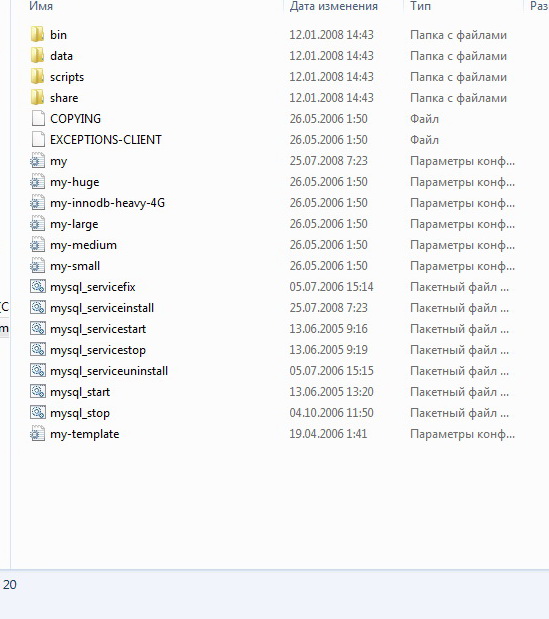
Прикрепленное изображение
Перейти в начало страницы         Просмотр профиля    Отправить личное сообщение
   + Цитировать сообщение
Статус пользователя c0rax
сообщение 16.12.2009, 11:32
Сообщение #8


Стаж: 18 лет

Сообщений: 1077
Благодарностей: 530
Полезность: 884

Цитата(CEST @ 16.12.2009, 11:17) *
shadowboss


Не нашел в папке MySQL сконф my.cnf. Есть еще вариант?


ps.gif Попробуй найти его поиском по файловой системе...
Перейти в начало страницы         Просмотр профиля    Отправить личное сообщение
Поблагодарили 2 раз
   + Цитировать сообщение
Статус пользователя CEST
сообщение 16.12.2009, 11:46
Сообщение #9
Стаж: 18 лет

Сообщений: 106
Благодарностей: 3
Полезность: 29

Цитата(shadowboss @ 16.12.2009, 12:32) *
ps.gif Попробуй найти его поиском по файловой системе...

Не нашел.
А my.ini не подойдет?

# MySQL Server Instance Configuration File
# ----------------------------------------------------------------------
# Generated by the MySQL Server Instance Configuration Wizard
#
#
# Installation Instructions
# ----------------------------------------------------------------------
#
# On Linux you can copy this file to /etc/my.cnf to set global options,
# mysql-data-dir/my.cnf to set server-specific options
# (@localstatedir@ for this installation) or to
# ~/.my.cnf to set user-specific options.
#
# On Windows you should keep this file in the installation directory
# of your server (e.g. C:\Program Files\MySQL\MySQL Server X.Y). To
# make sure the server reads the config file use the startup option
# "--defaults-file".
#
# To run run the server from the command line, execute this in a
# command line shell, e.g.
# mysqld --defaults-file="C:\Program Files\MySQL\MySQL Server X.Y\my.ini"
#
# To install the server as a Windows service manually, execute this in a
# command line shell, e.g.
# mysqld --install MySQLXY --defaults-file="C:\Program Files\MySQL\MySQL Server X.Y\my.ini"
#
# And then execute this in a command line shell to start the server, e.g.
# net start MySQLXY
#
#
# Guildlines for editing this file
# ----------------------------------------------------------------------
#
# In this file, you can use all long options that the program supports.
# If you want to know the options a program supports, start the program
# with the "--help" option.
#
# More detailed information about the individual options can also be
# found in the manual.
#
#
# CLIENT SECTION
# ----------------------------------------------------------------------
#
# The following options will be read by MySQL client applications.
# Note that only client applications shipped by MySQL are guaranteed
# to read this section. If you want your own MySQL client program to
# honor these values, you need to specify it as an option during the
# MySQL client library initialization.
#
[client]

port=3306

[mysql]

default-character-set = utf8

# SERVER SECTION
# ----------------------------------------------------------------------
#
# The following options will be read by the MySQL Server. Make sure that
# you have installed the server correctly (see above) so it reads this
# file.
#
[mysqld]

# The TCP/IP Port the MySQL Server will listen on
port=3306

#Path to installation directory. All paths are usually resolved relative to this.
basedir="C:\AppServ/MySQL"

#Path to the database root
datadir="C:\AppServ/MySQL/data/"

# The default character set that will be used when a new schema or table is
# created and no character set is defined
default-character-set = utf8
character-set-server = utf8
collation-server = utf8_general_ci
init_connect = 'SET collation_connection = utf8_general_ci'
init_connect = 'SET NAMES utf8'

# The default storage engine that will be used when create new tables when
#default-storage-engine=INNODB

# Set the SQL mode to strict
# sql-mode="STRICT_TRANS_TABLES,NO_AUTO_CREATE_USER,NO_ENGINE_SUBSTITUTION"
sql-mode="NO_AUTO_CREATE_USER,NO_ENGINE_SUBSTITUTION"

# The maximum amount of concurrent sessions the MySQL server will
# allow. One of these connections will be reserved for a user with
# SUPER privileges to allow the administrator to login even if the
# connection limit has been reached.
max_connections=16384

#
# For compatibility to other PHP MySQL function that still use old mysql connect.
#
#old_passwords = 1

# Query cache is used to cache SELECT results and later return them
# without actual executing the same query once again. Having the query
# cache enabled may result in significant speed improvements, if your
# have a lot of identical queries and rarely changing tables. See the
# "Qcache_lowmem_prunes" status variable to check if the current value
# is high enough for your load.
# Note: In case your tables change very often or if your queries are
# textually different every time, the query cache may result in a
# slowdown instead of a performance improvement.
query_cache_size=0

# The number of open tables for all threads. Increasing this value
# increases the number of file descriptors that mysqld requires.
# Therefore you have to make sure to set the amount of open files
# allowed to at least 4096 in the variable "open-files-limit" in
# section [mysqld_safe]
table_cache=256

# Maximum size for internal (in-memory) temporary tables. If a table
# grows larger than this value, it is automatically converted to disk
# based table This limitation is for a single table. There can be many
# of them.
tmp_table_size=9M


# How many threads we should keep in a cache for reuse. When a client
# disconnects, the client's threads are put in the cache if there aren't
# more than thread_cache_size threads from before. This greatly reduces
# the amount of thread creations needed if you have a lot of new
# connections. (Normally this doesn't give a notable performance
# improvement if you have a good thread implementation.)
thread_cache_size=8

#*** MyISAM Specific options

# The maximum size of the temporary file MySQL is allowed to use while
# recreating the index (during REPAIR, ALTER TABLE or LOAD DATA INFILE.
# If the file-size would be bigger than this, the index will be created
# through the key cache (which is slower).
myisam_max_sort_file_size=100G

# If the temporary file used for fast index creation would be bigger
# than using the key cache by the amount specified here, then prefer the
# key cache method. This is mainly used to force long character keys in
# large tables to use the slower key cache method to create the index.
myisam_max_extra_sort_file_size=100G

# If the temporary file used for fast index creation would be bigger
# than using the key cache by the amount specified here, then prefer the
# key cache method. This is mainly used to force long character keys in
# large tables to use the slower key cache method to create the index.
myisam_sort_buffer_size=17M

# Size of the Key Buffer, used to cache index blocks for MyISAM tables.
# Do not set it larger than 30% of your available memory, as some memory
# is also required by the OS to cache rows. Even if you're not using
# MyISAM tables, you should still set it to 8-64M as it will also be
# used for internal temporary disk tables.
key_buffer_size=10M

# Size of the buffer used for doing full table scans of MyISAM tables.
# Allocated per thread, if a full scan is needed.
read_buffer_size=64K
read_rnd_buffer_size=256K

# This buffer is allocated when MySQL needs to rebuild the index in
# REPAIR, OPTIMZE, ALTER table statements as well as in LOAD DATA INFILE
# into an empty table. It is allocated per thread so be careful with
# large settings.
sort_buffer_size=256K

log-slow-queries=mysql-slow.log
log-error=mysql.err

#*** INNODB Specific options ***


# Use this option if you have a MySQL server with InnoDB support enabled
# but you do not plan to use it. This will save memory and disk space
# and speed up some things.
skip-innodb

# Additional memory pool that is used by InnoDB to store metadata
# information. If InnoDB requires more memory for this purpose it will
# start to allocate it from the OS. As this is fast enough on most
# recent operating systems, you normally do not need to change this
# value. SHOW INNODB STATUS will display the current amount used.
innodb_additional_mem_pool_size=2M

# If set to 1, InnoDB will flush (fsync) the transaction logs to the
# disk at each commit, which offers full ACID behavior. If you are
# willing to compromise this safety, and you are running small
# transactions, you may set this to 0 or 2 to reduce disk I/O to the
# logs. Value 0 means that the log is only written to the log file and
# the log file flushed to disk approximately once per second. Value 2
# means the log is written to the log file at each commit, but the log
# file is only flushed to disk approximately once per second.
innodb_flush_log_at_trx_commit=1

# The size of the buffer InnoDB uses for buffering log data. As soon as
# it is full, InnoDB will have to flush it to disk. As it is flushed
# once per second anyway, it does not make sense to have it very large
# (even with long transactions).
innodb_log_buffer_size=1M

# InnoDB, unlike MyISAM, uses a buffer pool to cache both indexes and
# row data. The bigger you set this the less disk I/O is needed to
# access data in tables. On a dedicated database server you may set this
# parameter up to 80% of the machine physical memory size. Do not set it
# too large, though, because competition of the physical memory may
# cause paging in the operating system. Note that on 32bit systems you
# might be limited to 2-3.5G of user level memory per process, so do not
# set it too high.
innodb_buffer_pool_size=17M

# Size of each log file in a log group. You should set the combined size
# of log files to about 25%-100% of your buffer pool size to avoid
# unneeded buffer pool flush activity on log file overwrite. However,
# note that a larger logfile size will increase the time needed for the
# recovery process.
innodb_log_file_size=10M

# Number of threads allowed inside the InnoDB kernel. The optimal value
# depends highly on the application, hardware as well as the OS
# scheduler properties. A too high value may lead to thread thrashing.
innodb_thread_concurrency=8


Если это оно то в каких строках нужно вписывать
Цитата
bind-address = 192.168.1.5
?

Отредактировал: CEST, - 16.12.2009, 11:50
Перейти в начало страницы         Просмотр профиля    Отправить личное сообщение
Поблагодарили 1 раз
   + Цитировать сообщение
Статус пользователя c0rax
сообщение 16.12.2009, 13:30
Сообщение #10


Стаж: 18 лет

Сообщений: 1077
Благодарностей: 530
Полезность: 884

В самом низу просто допиши
Код
bind-address = 192.168.1.5
Перейти в начало страницы         Просмотр профиля    Отправить личное сообщение
Поблагодарили 2 раз
   + Цитировать сообщение
Статус пользователя CEST
сообщение 16.12.2009, 13:53
Сообщение #11
Стаж: 18 лет

Сообщений: 106
Благодарностей: 3
Полезность: 29

Цитата(shadowboss @ 16.12.2009, 14:30) *
В самом низу просто допиши
Код
bind-address = 192.168.1.5

Пока что то не работает...

В my.ini прописываю bind-address = 192.168.1.5,сохроняю через какое то время открываю снова а этой строки там уже нет....
Перейти в начало страницы         Просмотр профиля    Отправить личное сообщение
   + Цитировать сообщение
Статус пользователя c0rax
сообщение 16.12.2009, 15:41
Сообщение #12


Стаж: 18 лет

Сообщений: 1077
Благодарностей: 530
Полезность: 884

Цитата(CEST @ 16.12.2009, 13:53) *
Пока что то не работает...

В my.ini прописываю bind-address = 192.168.1.5,сохроняю через какое то время открываю снова а этой строки там уже нет....


Ты сначала останови MySQL сервер.
Потом пропиши в конфиг данную строку.
И потом только стартуй сервер.

Если такое будет посторятся, то тогда просто заного пропиши в файл строку, и выстави права этого файла на "Только для чтения"
Хотя вобще таких граблей, быть не должно...

Отредактировал: shadowboss, - 16.12.2009, 15:47
Перейти в начало страницы         Просмотр профиля    Отправить личное сообщение
Поблагодарили 1 раз
   + Цитировать сообщение
Статус пользователя CEST
сообщение 17.12.2009, 10:24
Сообщение #13
Стаж: 18 лет

Сообщений: 106
Благодарностей: 3
Полезность: 29

Цитата(shadowboss @ 16.12.2009, 16:41) *
Ты сначала останови MySQL сервер.
Потом пропиши в конфиг данную строку.
И потом только стартуй сервер.

Если такое будет посторятся, то тогда просто заного пропиши в файл строку, и выстави права этого файла на "Только для чтения"
Хотя вобще таких граблей, быть не должно...


Строку добавил...
Ошибка.


Цитата
Can't connect to MySQL server on 'localhost' (10061)


Цитата
PREVIOUS SESSION STARTING ...
Fatal Session Error at line 211: MYSQL Error: Can't connect to MySQL server on 'localhost' (10061)
Перейти в начало страницы         Просмотр профиля    Отправить личное сообщение
   + Цитировать сообщение
Статус пользователя c0rax
сообщение 18.12.2009, 1:39
Сообщение #14


Стаж: 18 лет

Сообщений: 1077
Благодарностей: 530
Полезность: 884

Цитата(CEST @ 17.12.2009, 10:24) *
Строку добавил...
Ошибка.
Can't connect to MySQL server on 'localhost' (10061)


Ну а зачем ты коннект к локалхосту делаешь???? если уже нужно использовать 192.168.1.5 ubeysya.gif
Понятное дело что не будет ничего таким образом работать, раз ты адрес мускула сменил...
В конфиге амхбанса amxbans/include/config.inc.php измени
Код
$config->db_host = "212.80.40.46";
$config->db_name = "zmd_amxbans";
$config->db_user = "zmd";
$config->db_pass = "cvpb424355zd";


Измени на свои текущие новые параметры...

Отредактировал: shadowboss, - 18.12.2009, 1:47
Перейти в начало страницы         Просмотр профиля    Отправить личное сообщение
   + Цитировать сообщение
Статус пользователя CEST
сообщение 18.12.2009, 14:10
Сообщение #15
Стаж: 18 лет

Сообщений: 106
Благодарностей: 3
Полезность: 29

Цитата(shadowboss @ 18.12.2009, 2:39) *
Ну а зачем ты коннект к локалхосту делаешь???? если уже нужно использовать 192.168.1.5 ubeysya.gif
Понятное дело что не будет ничего таким образом работать, раз ты адрес мускула сменил...
В конфиге амхбанса amxbans/include/config.inc.php измени
Код
$config->db_host = "212.80.40.46";
$config->db_name = "zmd_amxbans";
$config->db_user = "zmd";
$config->db_pass = "cvpb424355zd";


Измени на свои текущие новые параметры...


Так у меня помиму банса еще сайт и форум которые выходят в инет.

Отредактировал: CEST, - 18.12.2009, 14:11
Перейти в начало страницы         Просмотр профиля    Отправить личное сообщение
   + Цитировать сообщение
  Тема закрытаНачать новую тему
 
0 пользователей и 3 гостей читают эту тему: