Наконецто собрал, Клиент CS на новом билде |
Наши новости:
|
 Создание, настройка и продвижение counter-strike 1.6 серверов > Клиент Counter-Strike > Общие вопросы по клиенту > Наконецто собрал
 Правила форума
В данном разделе обсуждаются вопросы, связанные с клиентской частью. Темы не относящиеся к тематике раздела будут перемещены или удалены, а авторы наказаны.
При создании темы кратко опишите проблему в ее названии! Темы с названиями "Как сделать?", "Помогите", "Вопрос" и т.п. будут удалятся!
При создании темы кратко опишите проблему в ее названии! Темы с названиями "Как сделать?", "Помогите", "Вопрос" и т.п. будут удалятся!
|
|

 Поблагодарили
  Поблагодарили


 se7en2614
|
 18.7.2013, 14:06
Сообщение
|
 
|
Выложишь потом клиент или как?
я то новый revemu найти немогу нову кску =) а старые не работают |
   |


|
|
l2dawidow
|
18.7.2013, 14:10
Сообщение
|

|
Уменя рев еми за 15.07.2013) жду человека который еми делал и дал мне, пускай попробует перепилит ато нельзя зайти на сервера з новым дп рото.
Клиент выложу также в новом Рев еми мс в писуетса в рев.ини или 2 вариант прям в ддлку ) |
|
|
|
|
se7en2614
|
18.7.2013, 14:33
Сообщение
|
|
|
хм, на сайте только от 14.07.13 и то у меня кс не запустилась =)
|
|
|
|
|
RedL1ne
|
18.7.2013, 15:04
Сообщение
|

|
Ничего он не перепилит. Новый ревэму хорошо работает только с серверами с серверным ревэму.
На сервер если не пускает со стима - проблема в сервере. |
|
|
|
|
se7en2614
|
18.7.2013, 15:33
Сообщение
|
|
|
ни один из эмуляторов не работает блин =(
вот что выходит 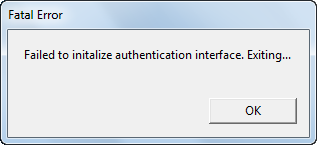
|
|
|
|
|
RedL1ne
|
18.7.2013, 16:33
Сообщение
|
|
|
se7en2614,
Неправильно устанавливаешь, либо запускаешь. Последний ревэму запускается только через лоадер. Вроде называется Loader.exe |
|
|
|
|
se7en2614
|
18.7.2013, 17:12
Сообщение
|
|
|
Цитата(RedL1ne @ 18.7.2013, 17:33)  se7en2614, Неправильно устанавливаешь, либо запускаешь. Последний ревэму запускается только через лоадер. Вроде называется Loader.exe revLoader.exe через него запускаю. |
|
|
|
|
RedL1ne
|
18.7.2013, 17:13
Сообщение
|
|
|
se7en2614,
Конфиг лоадера показывай |
|
|
|
|
M1r3x
|
18.7.2013, 17:29
Сообщение
|

|
se7en2614,
Гибридный пакет Visual C++Redist установлен? Visual C++Redist Вот пример сборки на 6027 билде. тык |
|
|
|
|
se7en2614
|
18.7.2013, 17:58
Сообщение
|
|
|
Цитата(M1r3x @ 18.7.2013, 17:29) se7en2614, Гибридный пакет Visual C++Redist установлен? Visual C++Redist Вот пример сборки на 6027 билде. тык если есть уже сборка на свете, то я уж не буду заморачиваться делать свою =) мне-то чисто поиграть на других компах =) конфиг rev.ini Скрытый текст [Loader] # You can launch revLoader in two ways: # # 1) Create a shortcut to revLoader and apply the following # command line options: # # -appid <APPID> where <APPID> is the application in question. # If supplied revLoader will create a steam_appid.txt # file with the value specified # -launch <PROCNAME> where <PROCNAME> is the executable to # launch # # All other command line options are passed through to the # launched executable, so: # # revLoader.exe -appid 12345 -launch MyApp.exe -silent /help # # This will create a steam_appid.txt file with the value 12345 # Before launching MyApp.exe with the arguments -silent /help # # 2) Specify the name of the application to load in the ProcName # setting below as with previous versions of revLoader. # You can also specify the command line if required. # # e.g ProcName=MyApp.exe -silent /help # ProcName=hl.exe -steam -game cstrike -silent /help [Emulator] # CacheEnabled set to true to enable loading apps from GCF. # If it is true, and a clientregistry.blob file is not supplied, # then you must supply revApps.ini file with the correct cache requirements. # See the example revApps.ini, however it is highly recommended that you use # a clientregistry.blob file for maximum compatibility # # Default = False # CacheEnabled = false # CachePath - set to the folder where your GCF files are located # # Default = (n/a) # CachePath = D:\Steam\SteamApps # Language - rev emu will automagically load the correct language files. # This can be English, French, Italian, German, Spanish, sChinese, # Korean, Koreana, tChinese, Japanese, Russian, Thai, or Portugeuse # # revEmu will try to set the Language key in the following order: # Use the Language key in the this rev.ini if it is present # Use the Steam Language key in the registry if it is present # Default the Language to English # #Language = English Language = Russian # Change Logging to True to enable/disable log file output for steam.dll # # Default = False # Logging=false # Change SteamDll to point to your official Steam client DLL. # This setting is required for Steam UserID Validation functions # to support legit Steam IDs. Otherwise, all clients would get # IDs generated from their IP addresses. # Also make sure you uncomment the line below (remove "#") # if you want to use this setting! # Note that this setting only applies to games using SteamGameServer # up to version 003. (e.g. CS: Source, Team Fortess 2, Garry's Mod) # # Default = (n/a) # SteamDll=.\Steam\Steam.dll # Change SteamClient to True if you want to use the steamclient emulator. # This setting is recommended to be true for both clients \ game servers # and for all games, except games which use SteamClient006 interface # (e.g. CS: Source, Half-Life 2: Deathmatch) # To see if the game is using this old interface, enable SteamClient, # enable Logging and you will notice a log line "Using SteamClientXXX". # If 007, leave the option ON, otherwise, it is recommended not to use it. # # Default = False # SteamClient = True # Change SteamUser to the steam username that you wish to use with revEmu # Defaults to revCrew if not specified # SteamUser = SteamPlayer [Log] # If Logging is set to True, choose which functions would you like to log. # # Default = False # FileSystem=False Account=False UserID=False [steamclient] ################################### NOTE #################################### # These settings may apply even if you don't choose to use steamclient.dll! # ############################################################################# # # Change the setting below to set your PlayerName (used in src2007 engine) # not use "" # # Default = REVOLUTiON # PlayerName=Your name # Change the setting below to enable/disable log file output for steamclient.dll # # Default = False # Logging=true # Change ClientDLL to point to the original steamclient.dll # This setting will enable VAC for your server and your server will be listed # on Valve master server! Also, Steam clients will have their regular Steam IDs # Please use the steamclient.dll from Steam folder! # # Default = (n/a) # #ClientDLL=.\Steam\steamclient.dll # DisableUnlockedItems enables you to choose whether to use the new weapons in # Team Fortress 2. This setting applies to you only if you are a regular player, # or to all your clients if you are a server hoster. # # Default = False # #DisableUnlockedItems = True # If you use in Ultimate SSDK change the setting below to True # use only Ultimate SSDK enable else disable. # # Default = False # #EnableSDK = True #Use DNS masterservers valve, if port mastersrver 27010-27011 not problem #if port 27015 use mix MasterServer = 208.64.200.65:27015 # # Default = False # #Use_hl_master = true #Change the setting to set masterserver, from where serverlist will be got. #No support Setti masterserver..... #Default = 72.165.61.136:27015 only for HL2 #Friends tab in serverbrowser shows another masterserver for VIP server ($) # #HL1 servers MasterServer = 188.40.40.201:27010 #MasterServer = 69.28.158.131:27010 #MasterServer = 209.197.20.34:27010 #MasterServer = 69.28.140.247:27010 # #HL2 servers # #MasterServer = 208.64.200.52:27011 #MasterServer = 208.64.200.65:27015 #MasterServer = 63.234.149.83:27011 #MasterServer = 63.234.149.90:27011 # #rdkf # #MasterServer = 68.142.72.250:27012 #Search game version in MasterServer. #Default search all version. # #GameVersion = 1.0.0.75 #Add rename ClanTag maximum 12 symbol UTF-8 or 24 symbol ANSI #ex. ClanTag = revcrev # ClanTag=[revcrew] # # Use avatar enable. Test images no-steam avatar in platform/avatar1.dat(delete\rename it`s file not show this images) # # Default = False # Use_avatar = true [GameServer] # GameServer policy rules # Allow (v9.73 < revEmu < 9.83) clients to join your server # # Default = True # AllowOldRev74=False # Allow revEmu v9.63 ~ 9.73 clients to join your server # revEmu v9.62 and below will be rejected nevertheless # # Default = True # AllowOldRev=False # Allow unknown clients to join your server # # Default = True # AllowUnknown=False # Allow cracked Steam clients to join your server # # Default = True # #AllowCracked=False # Allow legitimate Steam clients to join your server # # Default = True # #AllowLegit=False #Allowed any count connect Unknown client with one IP (25 Unknown clients 1 IP default true) # #AllowedAnyCountConnectUnknownClientWithOneIP = false # Allow shows bots as normal players in the server(in serverbrowser) # # Default = false Fake_player= false # Allow revemu clients to join your server (steamid subject to substitution) # # Default = false RevEmu_2012 = false # Reject text for client cs 1.6 max 128 symbol # RejectText = Downloading client on http://you_site/ [GameServerNSNet] #Use only tf2 server example: EnableNSNetSvc = UDP # #EnableNSNetSvc = [False/UDP/TCP/BOTH] #ServerIPNSNet = #NSNetDedicatedPort = Порт(Только для Slave серевров) #AdditionalSlaveServer = IP:PORT #AdditionalSlaveServer = IP:PORT #AdditionalSlaveServer = IP:PORT #AdditionalSlaveServer = IP:PORT |
|
|
|
  |
0 пользователей и 1 гостей читают эту тему:

Powered By Invision Power Board
© 2005-2026
Counter Strike Support Community
Counter Strike Support Community