Правила форума Гаранты форума
Размещение рекламы AMX-X компилятор

Здравствуйте, гость Вход | Регистрация

Наши новости:

14-дек
24-апр
10-апр
11-апр

2 страниц V   1 2

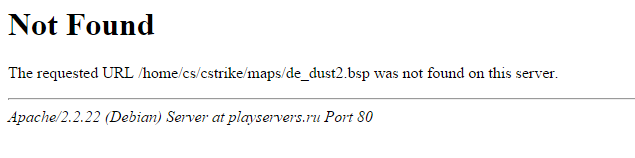
Not Found (Apache2, Debian 7)

[РЕШЕНО]
Shelest
сообщение 18.6.2015, 7:35
Сообщение #1
Стаж: 11 лет

Сообщений: 216
Благодарностей: 86
Полезность: 154

Здравствуйте.
Перехожу по адресу:
name.ru/home/cs/cstrike/maps/de_dust2.bsp
То есть в результате должно скачать de_dust2.bsp
Но вместо этого вижу следующее:

Отредактировал: Shelest, - 18.6.2015, 7:37
Прикрепленные файлы:
Прикрепленное изображение
Перейти в начало страницы         Просмотр профиля    Отправить личное сообщение
   Цитировать сообщение
Статус пользователя georgeml
сообщение 18.6.2015, 7:48
Сообщение #2
Стаж: 12 лет

Сообщений: 1467
Благодарностей: 439
Полезность: 423

Правильно говорит not found. Рут каталог виртуалхоста вряд-ли /home (хотя, кто вас знает). Смотрите настройки хоста в /etc/apache2/sites-available
Перейти в начало страницы         Просмотр профиля    Отправить личное сообщение
   + Цитировать сообщение
Статус пользователя kasIIep
сообщение 18.6.2015, 7:54
Сообщение #3
Стаж: 17 лет

Сообщений: 333
Благодарностей: 88
Полезность: 209

Меценат Меценат

name.ru открывается?)
в дебиан homedir apache /var/www
в любом случае надо смотреть ваши папки и прописывать алиас или правильный путь выбирать

Отредактировал: kasIIep, - 18.6.2015, 7:58
Перейти в начало страницы         Просмотр профиля    Отправить личное сообщение
   + Цитировать сообщение
Shelest
сообщение 18.6.2015, 17:03
Сообщение #4
Стаж: 11 лет

Сообщений: 216
Благодарностей: 86
Полезность: 154

Помогите пожалуйста как сделать/настроить чтобы всё что находиться в /home директории можно было скачивать.
Перейти в начало страницы         Просмотр профиля    Отправить личное сообщение
   + Цитировать сообщение
Статус пользователя kadun
сообщение 18.6.2015, 17:06
Сообщение #5


Стаж: 12 лет

Сообщений: 222
Благодарностей: 43
Полезность: 156

.htaccess положите и разрешите прямой доступ к файлам и прямую скачку

Отредактировал: kadun, - 18.6.2015, 17:07
Перейти в начало страницы         Просмотр профиля    Отправить личное сообщение
   + Цитировать сообщение
Shelest
сообщение 18.6.2015, 17:09
Сообщение #6
Стаж: 11 лет

Сообщений: 216
Благодарностей: 86
Полезность: 154

Цитата(kadun @ 18.6.2015, 19:06) *
.htaccess положите и разрешите прямой доступ к файлам и прямую скачку

Можно подробнее пожалуйста.
Перейти в начало страницы         Просмотр профиля    Отправить личное сообщение
   + Цитировать сообщение
Статус пользователя kadun
сообщение 18.6.2015, 17:23
Сообщение #7


Стаж: 12 лет

Сообщений: 222
Благодарностей: 43
Полезность: 156

Цитата(Shelest @ 18.6.2015, 18:09) *
Можно подробнее пожалуйста.

Положить в корень .httpacces с содержимым:
Код
Allow from all

/home/ - корень

Отредактировал: kadun, - 18.6.2015, 17:26
Перейти в начало страницы         Просмотр профиля    Отправить личное сообщение
   + Цитировать сообщение
Shelest
сообщение 18.6.2015, 17:25
Сообщение #8
Стаж: 11 лет

Сообщений: 216
Благодарностей: 86
Полезность: 154

Цитата(kadun @ 18.6.2015, 19:23) *
Положить в корень .httpacces с содержимым:
Код
Allow from all

Сделал как и написали.
Не помогло, всё та же ошибка.

Отредактировал: Shelest, - 18.6.2015, 17:29
Перейти в начало страницы         Просмотр профиля    Отправить личное сообщение
   + Цитировать сообщение
Статус пользователя kadun
сообщение 18.6.2015, 17:34
Сообщение #9


Стаж: 12 лет

Сообщений: 222
Благодарностей: 43
Полезность: 156

Цитата(Shelest @ 18.6.2015, 18:25) *
Сделал как и написали.
Не помогло, всё та же ошибка.

За мной косяк.
.htaccess

Order Allow,Deny
Allow from all
Перейти в начало страницы         Просмотр профиля    Отправить личное сообщение
   + Цитировать сообщение
Shelest
сообщение 18.6.2015, 17:35
Сообщение #10
Стаж: 11 лет

Сообщений: 216
Благодарностей: 86
Полезность: 154

Цитата(kadun @ 18.6.2015, 19:34) *
За мной косяк.
.htaccess

Order Allow,Deny
Allow from all

Всё так же, без изменений.
Может что-то в apache2 необходимо исправить?
Перейти в начало страницы         Просмотр профиля    Отправить личное сообщение
   + Цитировать сообщение
Статус пользователя kadun
сообщение 18.6.2015, 17:46
Сообщение #11


Стаж: 12 лет

Сообщений: 222
Благодарностей: 43
Полезность: 156

Цитата(Shelest @ 18.6.2015, 18:35) *
Всё так же, без изменений.
Может что-то в apache2 необходимо исправить?

Добавте листинг, должен выводить список на страницу:

Options +Indexes

Сейчас в дороге, не думаю) скоро приеду посмотрю.

Отредактировал: kadun, - 18.6.2015, 17:47
Перейти в начало страницы         Просмотр профиля    Отправить личное сообщение
   + Цитировать сообщение
Shelest
сообщение 18.6.2015, 17:49
Сообщение #12
Стаж: 11 лет

Сообщений: 216
Благодарностей: 86
Полезность: 154

Цитата(kadun @ 18.6.2015, 19:46) *
Добавте листинг, должен выводить список на страницу:

Options +Indexes

Сейчас в дороге, не думаю) скоро приеду посмотрю.

Всё так же.
Хорошо, буду ждать.
Перейти в начало страницы         Просмотр профиля    Отправить личное сообщение
   + Цитировать сообщение
Статус пользователя Fire
сообщение 18.6.2015, 18:29
Сообщение #13


Иконка группы

Стаж: 17 лет

Сообщений: 2201
Благодарностей: 2227
Полезность: 963

Большего бреда что тут пишут советчики я еще не видел...


Перейти в начало страницы         Просмотр профиля    Отправить личное сообщение
Поблагодарили 1 раз
   + Цитировать сообщение
Shelest
сообщение 18.6.2015, 18:58
Сообщение #14
Стаж: 11 лет

Сообщений: 216
Благодарностей: 86
Полезность: 154

Цитата(Fire @ 18.6.2015, 20:29) *
Большего бреда что тут пишут советчики я еще не видел...

Подскажешь что нибудь?
Перейти в начало страницы         Просмотр профиля    Отправить личное сообщение
   + Цитировать сообщение
Статус пользователя kadun
сообщение 18.6.2015, 19:03
Сообщение #15


Стаж: 12 лет

Сообщений: 222
Благодарностей: 43
Полезность: 156

Цитата(Shelest @ 18.6.2015, 18:49) *
Всё так же.
Хорошо, буду ждать.

Извини, ввел в заблуждение, невнимательно прочитал #1 подумав что нет прав на доступ, а не то что апач выдает файл не найден.

Покажи кфг апача и какие модули детективы использует.

Отредактировал: kadun, - 18.6.2015, 19:05
Перейти в начало страницы         Просмотр профиля    Отправить личное сообщение
   + Цитировать сообщение
Shelest
сообщение 18.6.2015, 19:08
Сообщение #16
Стаж: 11 лет

Сообщений: 216
Благодарностей: 86
Полезность: 154

Цитата(kadun @ 18.6.2015, 21:03) *
Извини, ввел в заблуждение, невнимательно прочитал #1 подумав что нет прав на доступ, а не то что апач выдает файл не найден.

Покажи кфг апача и какие модули детективы использует.

Добавь меня в Skype, легче будет.
Вот, сам конфиг:
Скрытый текст
# This is the main Apache server configuration file. It contains the
# configuration directives that give the server its instructions.
# See http://httpd.apache.org/docs/2.2/ for detailed information about
# the directives and /usr/share/doc/apache2-common/README.Debian.gz about
# Debian specific hints.
#
#
# Summary of how the Apache 2 configuration works in Debian:
# The Apache 2 web server configuration in Debian is quite different to
# upstream's suggested way to configure the web server. This is because Debian's
# default Apache2 installation attempts to make adding and removing modules,
# virtual hosts, and extra configuration directives as flexible as possible, in
# order to make automating the changes and administering the server as easy as
# possible.

# It is split into several files forming the configuration hierarchy outlined
# below, all located in the /etc/apache2/ directory:
#
# /etc/apache2/
# |-- apache2.conf
# | `-- ports.conf
# |-- mods-enabled
# | |-- *.load
# | `-- *.conf
# |-- conf.d
# | `-- *
# `-- sites-enabled
# `-- *
#
#
# * apache2.conf is the main configuration file (this file). It puts the pieces
# together by including all remaining configuration files when starting up the
# web server.
#
# In order to avoid conflicts with backup files, the Include directive is
# adapted to ignore files that:
# - do not begin with a letter or number
# - contain a character that is neither letter nor number nor _-:.
# - contain .dpkg
#
# Yet we strongly suggest that all configuration files either end with a
# .conf or .load suffix in the file name. The next Debian release will
# ignore files not ending with .conf (or .load for mods-enabled).
#
# * ports.conf is always included from the main configuration file. It is
# supposed to determine listening ports for incoming connections, and which
# of these ports are used for name based virtual hosts.
#
# * Configuration files in the mods-enabled/ and sites-enabled/ directories
# contain particular configuration snippets which manage modules or virtual
# host configurations, respectively.
#
# They are activated by symlinking available configuration files from their
# respective *-available/ counterparts. These should be managed by using our
# helpers a2enmod/a2dismod, a2ensite/a2dissite. See
# their respective man pages for detailed information.
#
# * Configuration files in the conf.d directory are either provided by other
# packages or may be added by the local administrator. Local additions
# should start with local- or end with .local.conf to avoid name clashes. All
# files in conf.d are considered (excluding the exceptions noted above) by
# the Apache 2 web server.
#
# * The binary is called apache2. Due to the use of environment variables, in
# the default configuration, apache2 needs to be started/stopped with
# /etc/init.d/apache2 or apache2ctl. Calling /usr/bin/apache2 directly will not
# work with the default configuration.


# Global configuration
#

#
# ServerRoot: The top of the directory tree under which the server's
# configuration, error, and log files are kept.
#
# NOTE! If you intend to place this on an NFS (or otherwise network)
# mounted filesystem then please read the LockFile documentation (available
# at <URL:http://httpd.apache.org/docs/2.2/mod/mpm_common.html#lockfile>);
# you will save yourself a lot of trouble.
#
# Do NOT add a slash at the end of the directory path.
#
#ServerRoot "/etc/apache2"

#
# The accept serialization lock file MUST BE STORED ON A LOCAL DISK.
#
LockFile ${APACHE_LOCK_DIR}/accept.lock

#
# PidFile: The file in which the server should record its process
# identification number when it starts.
# This needs to be set in /etc/apache2/envvars
#
PidFile ${APACHE_PID_FILE}

#
# Timeout: The number of seconds before receives and sends time out.
#
Timeout 300

#
# KeepAlive: Whether or not to allow persistent connections (more than
# one request per connection). Set to "Off" to deactivate.
#
KeepAlive On

#
# MaxKeepAliveRequests: The maximum number of requests to allow
# during a persistent connection. Set to 0 to allow an unlimited amount.
# We recommend you leave this number high, for maximum performance.
#
MaxKeepAliveRequests 100

#
# KeepAliveTimeout: Number of seconds to wait for the next request from the
# same client on the same connection.
#
KeepAliveTimeout 5

##
## Server-Pool Size Regulation (MPM specific)
##

# prefork MPM
# StartServers: number of server processes to start
# MinSpareServers: minimum number of server processes which are kept spare
# MaxSpareServers: maximum number of server processes which are kept spare
# MaxClients: maximum number of server processes allowed to start
# MaxRequestsPerChild: maximum number of requests a server process serves
<IfModule mpm_prefork_module>
StartServers 5
MinSpareServers 5
MaxSpareServers 10
MaxClients 150
MaxRequestsPerChild 0
</IfModule>

# worker MPM
# StartServers: initial number of server processes to start
# MinSpareThreads: minimum number of worker threads which are kept spare
# MaxSpareThreads: maximum number of worker threads which are kept spare
# ThreadLimit: ThreadsPerChild can be changed to this maximum value during a
# graceful restart. ThreadLimit can only be changed by stopping
# and starting Apache.
# ThreadsPerChild: constant number of worker threads in each server process
# MaxClients: maximum number of simultaneous client connections
# MaxRequestsPerChild: maximum number of requests a server process serves
<IfModule mpm_worker_module>
StartServers 2
MinSpareThreads 25
MaxSpareThreads 75
ThreadLimit 64
ThreadsPerChild 25
MaxClients 150
MaxRequestsPerChild 0
</IfModule>

# event MPM
# StartServers: initial number of server processes to start
# MinSpareThreads: minimum number of worker threads which are kept spare
# MaxSpareThreads: maximum number of worker threads which are kept spare
# ThreadsPerChild: constant number of worker threads in each server process
# MaxClients: maximum number of simultaneous client connections
# MaxRequestsPerChild: maximum number of requests a server process serves
<IfModule mpm_event_module>
StartServers 2
MinSpareThreads 25
MaxSpareThreads 75
ThreadLimit 64
ThreadsPerChild 25
MaxClients 150
MaxRequestsPerChild 0
</IfModule>

# These need to be set in /etc/apache2/envvars
User ${APACHE_RUN_USER}
Group ${APACHE_RUN_GROUP}

#
# AccessFileName: The name of the file to look for in each directory
# for additional configuration directives. See also the AllowOverride
# directive.
#

AccessFileName .htaccess

#
# The following lines prevent .htaccess and .htpasswd files from being
# viewed by Web clients.
#
<Files ~ "^\.ht">
Order allow,deny
Deny from all
Satisfy all
</Files>

#
# DefaultType is the default MIME type the server will use for a document
# if it cannot otherwise determine one, such as from filename extensions.
# If your server contains mostly text or HTML documents, "text/plain" is
# a good value. If most of your content is binary, such as applications
# or images, you may want to use "application/octet-stream" instead to
# keep browsers from trying to display binary files as though they are
# text.
#
# It is also possible to omit any default MIME type and let the
# client's browser guess an appropriate action instead. Typically the
# browser will decide based on the file's extension then. In cases
# where no good assumption can be made, letting the default MIME type
# unset is suggested instead of forcing the browser to accept
# incorrect metadata.
#
DefaultType None


#
# HostnameLookups: Log the names of clients or just their IP addresses
# e.g., www.apache.org (on) or 204.62.129.132 (off).
# The default is off because it'd be overall better for the net if people
# had to knowingly turn this feature on, since enabling it means that
# each client request will result in AT LEAST one lookup request to the
# nameserver.
#
HostnameLookups Off

# ErrorLog: The location of the error log file.
# If you do not specify an ErrorLog directive within a <VirtualHost>
# container, error messages relating to that virtual host will be
# logged here. If you *do* define an error logfile for a <VirtualHost>
# container, that host's errors will be logged there and not here.
#
ErrorLog ${APACHE_LOG_DIR}/error.log

#
# LogLevel: Control the number of messages logged to the error_log.
# Possible values include: debug, info, notice, warn, error, crit,
# alert, emerg.
#
LogLevel warn

# Include module configuration:
Include mods-enabled/*.load
Include mods-enabled/*.conf

# Include list of ports to listen on and which to use for name based vhosts
Include ports.conf

#
# The following directives define some format nicknames for use with
# a CustomLog directive (see below).
# If you are behind a reverse proxy, you might want to change %h into %{X-Forwarded-For}i
#
LogFormat "%v:%p %h %l %u %t \"%r\" %>s %O \"%{Referer}i\" \"%{User-Agent}i\"" vhost_combined
LogFormat "%h %l %u %t \"%r\" %>s %O \"%{Referer}i\" \"%{User-Agent}i\"" combined
LogFormat "%h %l %u %t \"%r\" %>s %O" common
LogFormat "%{Referer}i -> %U" referer
LogFormat "%{User-agent}i" agent

# Include of directories ignores editors' and dpkg's backup files,
# see the comments above for details.

# Include generic snippets of statements
Include conf.d/

# Include the virtual host configurations:
Include sites-enabled/

# Include phpmyadmin configurations:
Include /etc/phpmyadmin/apache.conf
Перейти в начало страницы         Просмотр профиля    Отправить личное сообщение
   + Цитировать сообщение
Shelest
сообщение 18.6.2015, 20:10
Сообщение #17
Стаж: 11 лет

Сообщений: 216
Благодарностей: 86
Полезность: 154

Ребята, помогите пожалуйста.
Перейти в начало страницы         Просмотр профиля    Отправить личное сообщение
   + Цитировать сообщение
Статус пользователя Fire
сообщение 18.6.2015, 22:04
Сообщение #18


Иконка группы

Стаж: 17 лет

Сообщений: 2201
Благодарностей: 2227
Полезность: 963

/etc/apache2/sites-enabled/default -- содержимое сюда


Перейти в начало страницы         Просмотр профиля    Отправить личное сообщение
   + Цитировать сообщение
Статус пользователя georgeml
сообщение 19.6.2015, 1:31
Сообщение #19
Стаж: 12 лет

Сообщений: 1467
Благодарностей: 439
Полезность: 423

Цитата(Fire @ 18.6.2015, 19:29) *
Большего бреда что тут пишут советчики я еще не видел...

Цитата(Fire @ 18.6.2015, 23:04) *
/etc/apache2/sites-enabled/default -- содержимое сюда

Это ненамного меньший бред, чем все остальное. С каких пор конфиги хоста лежат в sites-enabled/ ? Максимум- симлинки
И зачем трогать default? Создавать отдельные *.conf нынче не в моде?
Цитата(georgeml @ 18.6.2015, 8:48) *
Смотрите настройки хоста в /etc/apache2/sites-available

Видимо, человеку проще дождаться готового решения, чем разбираться самому. Логично предположу, что ответы, не доступные для понимания, тупо игнорируются.
Перейти в начало страницы         Просмотр профиля    Отправить личное сообщение
   + Цитировать сообщение
Shelest
сообщение 19.6.2015, 1:46
Сообщение #20
Стаж: 11 лет

Сообщений: 216
Благодарностей: 86
Полезность: 154

Цитата(Fire @ 19.6.2015, 0:04) *
/etc/apache2/sites-enabled/default -- содержимое сюда

Спасибо что откликнулись, я ожидал от Вас сообщения.
Вот:
Скрытый текст
<VirtualHost *:80>
ServerAdmin webmaster@localhost

DocumentRoot /var/www
<Directory />
Options FollowSymLinks
AllowOverride All
</Directory>
<Directory /var/www/>
Options Indexes FollowSymLinks -MultiViews
AllowOverride All
Order allow,deny
allow from all
</Directory>

ScriptAlias /cgi-bin/ /usr/lib/cgi-bin/
<Directory "/usr/lib/cgi-bin">
AllowOverride None
Options +ExecCGI -MultiViews +SymLinksIfOwnerMatch
Order allow,deny
Allow from all
</Directory>

ErrorLog ${APACHE_LOG_DIR}/error.log

# Possible values include: debug, info, notice, warn, error, crit,
# alert, emerg.
LogLevel warn

CustomLog ${APACHE_LOG_DIR}/access.log combined
</VirtualHost>
Перейти в начало страницы         Просмотр профиля    Отправить личное сообщение
   + Цитировать сообщение
2 страниц V   1 2
 
Ответить в данную темуНачать новую тему
 
0 пользователей и 1 гостей читают эту тему: